We're excited to announce our latest product updates, featuring powerful new capabilities designed to help you mobilise workers faster, improve operational efficiency, and deliver measurable business impact.
This release brings the MyPass Skills Passport mobile app to New Zealand, introduces five new platform features, and enhances the mobile experience for all users. Let's dive into what's new:
- MyPass Skills Passport Mobile App
- Job Catalogue
- Supplier Contacts
- Project Documents
- Supplier Organisation View
- Public Profile Enhancement
MyPass Skills Passport Mobile App: Now Available in New Zealand
We're thrilled to announce that the MyPass Skills Passport mobile app is now available for workers in New Zealand.
The app makes it effortless for workers to manage their own compliance – from uploading certifications to responding to role invitations – all from their mobile device. This means faster worker mobilisation, reduced administrative workload, and shorter time to productivity.
What's new in this release

For all users:
Push Notifications
Workers now receive instant alerts directly to their mobile device when:
-
Certifications are about to expire
-
Documents need attention or have been rejected
-
Verification status changes
No more missed deadlines or last-minute compliance scrambles.
Biometrics Sign-In
Workers can now sign in quickly and securely using:
-
Face ID on supported iOS devices
-
Fingerprint authentication on supported Android devices
Getting started
Workers in New Zealand can download the free MyPass Skills Passport app from the App Store or Google Play Store. Australian workers should update their existing app to access the new features.

Job Catalogue: Standardise Your Role Taxonomy
The challenge
The lack of control over role and occupation taxonomy has been a persistent challenge for admins. Inconsistent role naming leads to:
-
Compromised reporting accuracy
-
Data quality issues in downstream systems
-
Difficulty tracking workforce composition
- Challenges with skills matrix alignment
The solution
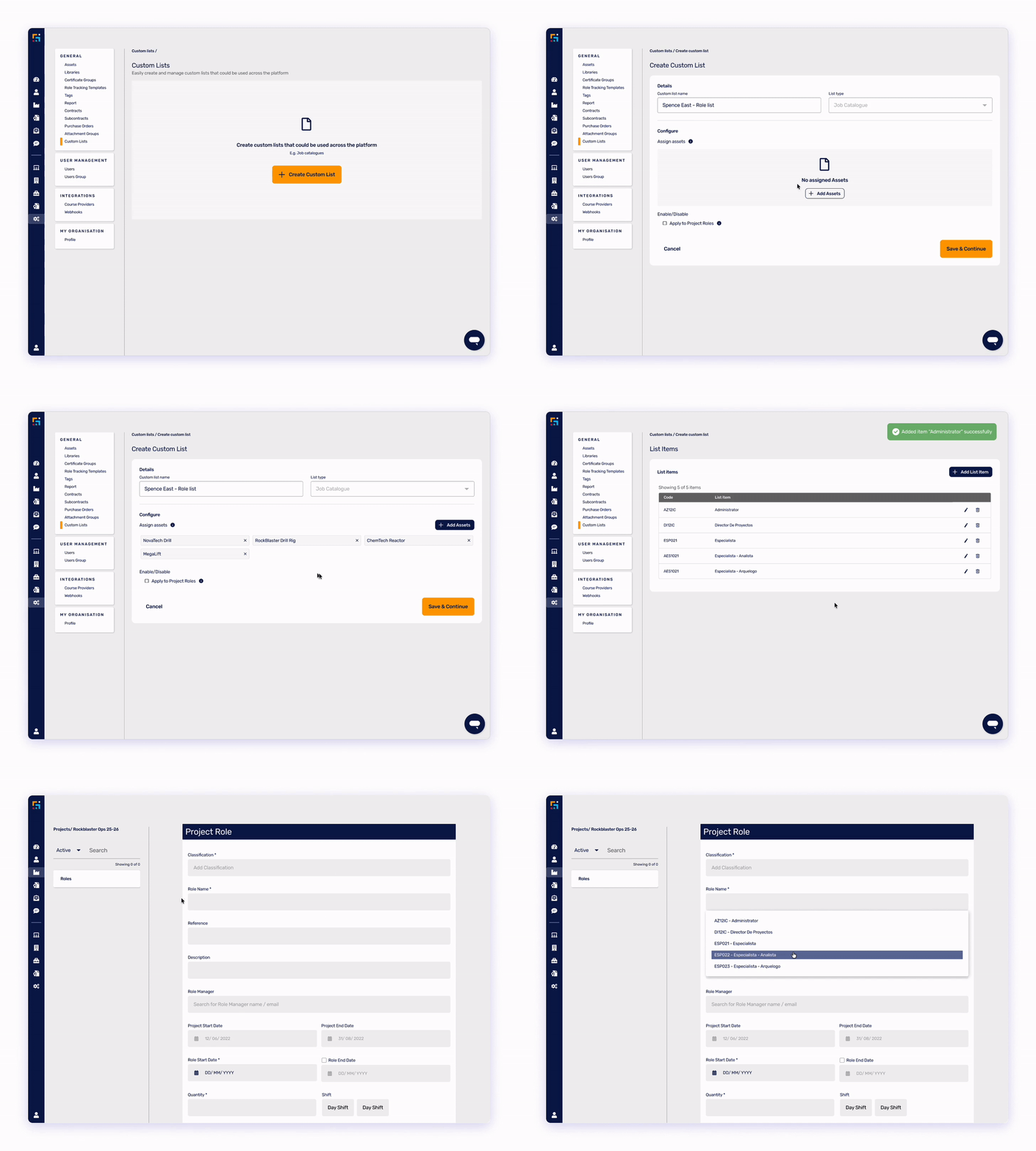
The Job Catalogue empowers admins to build and enforce their own standard taxonomy. Create customised job lists specific to your organisation, then require users to select role names from your Job Catalogue when creating project roles.
Key capabilities
Build your taxonomy
- Create standardised job lists tailored to your organisation
- Define role codes and names that align with your internal systems
- Manage multiple job catalogues for different business units or regions
Enforce consistency
- Configure projects to require role selection from your Job Catalogue
- Prevent free-text role entry that creates data inconsistencies
- Ensure immediate and pervasive data consistency across all projects
Business impact
By standardising role naming conventions, you'll improve:
- Reporting accuracy – Reliable workforce data for decision-making
- System integration – Clean data for downstream systems like payroll and HR platforms
- Operational efficiency – Reduced time spent cleaning and reconciling data
- Compliance visibility – Clear understanding of role-specific requirements

Supplier Contacts: Find the Right Person, Fast
The Challenge
Project admins often need to review worker compliance status before confirming them to site. When issues arise – missing documents, expired certifications, unclear information – admins waste valuable time:
-
Searching through email threads for contact information
-
Navigating multiple systems to find the right supplier admin
- Experiencing delays while trying to resolve worker issues
The Solution
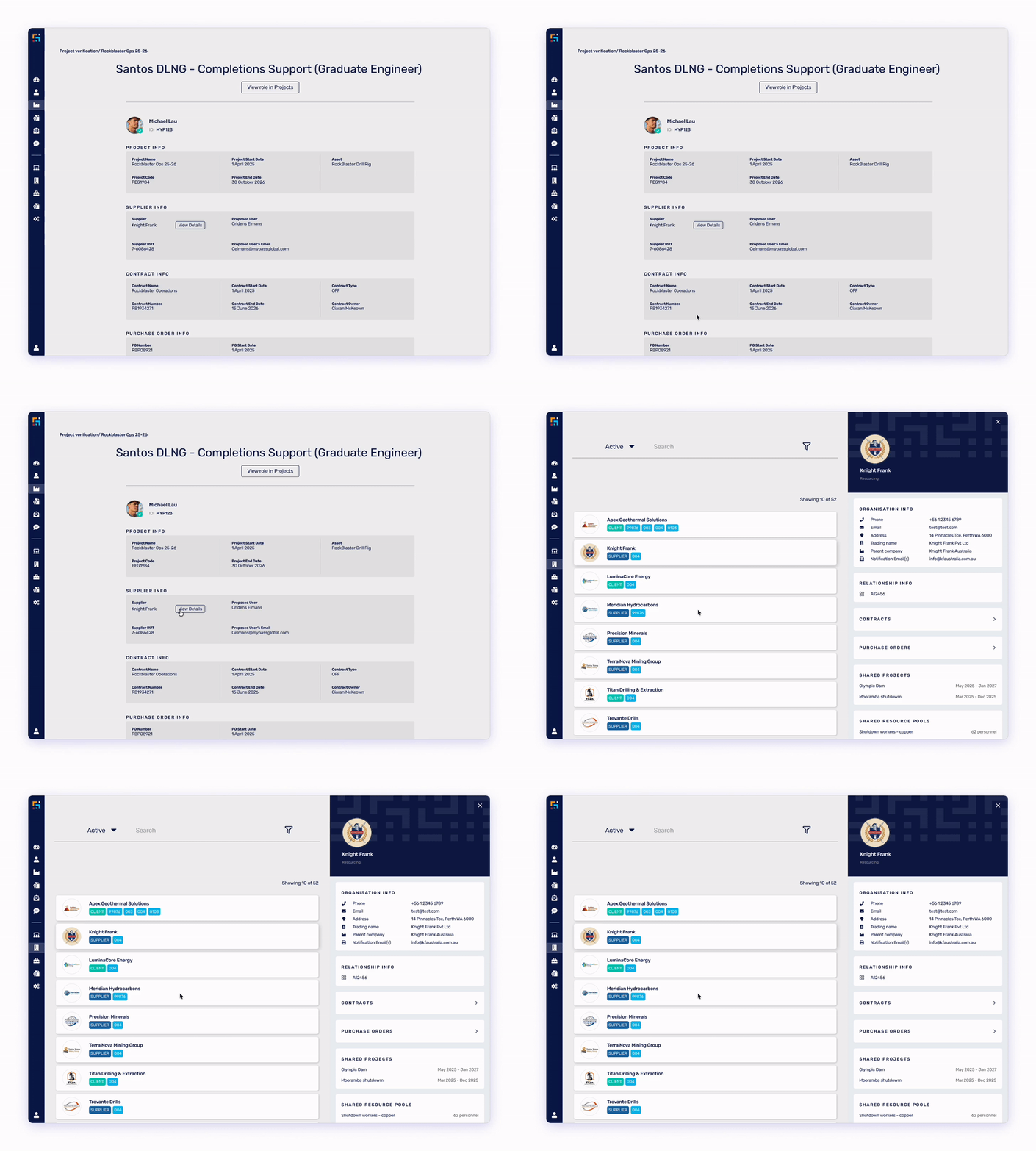
MyPass now displays contact information for the supplier admin who proposed each worker directly within the worker's project information.
How it works
When viewing a worker's role details or compliance status, you'll see:
-
Supplier admin name and contact details
-
Email address
- Supplier organisation information
-
Faster issue resolution – Contact the right person immediately when compliance issues arise
-
Reduced administrative burden – No more hunting through files and emails
-
Improved communication - Direct line to the person who knows the worker best
-
Better worker experience – Quicker resolution means workers get on-site faster
This feature is particularly valuable during peak mobilisation periods when efficient communication between admins and suppliers is critical.

Project Documents: Centralise Supplier Documentation
The challenge
Suppliers share many different project documents with site operators – workday resolutions, drug & alcohol management plans, safety procedures, and more. These documents often arrive through various channels:
-
Email attachments
-
WhatsApp messages
-
Physical copies
-
Multiple file-sharing flatforms
This fragmentation makes it difficult to:
- Track which suppliers have submitted required documents
- Ensure documents are current and approved
- Connect documents to specific worker requirements
- Maintain audit trails for compliance purposes
The solution
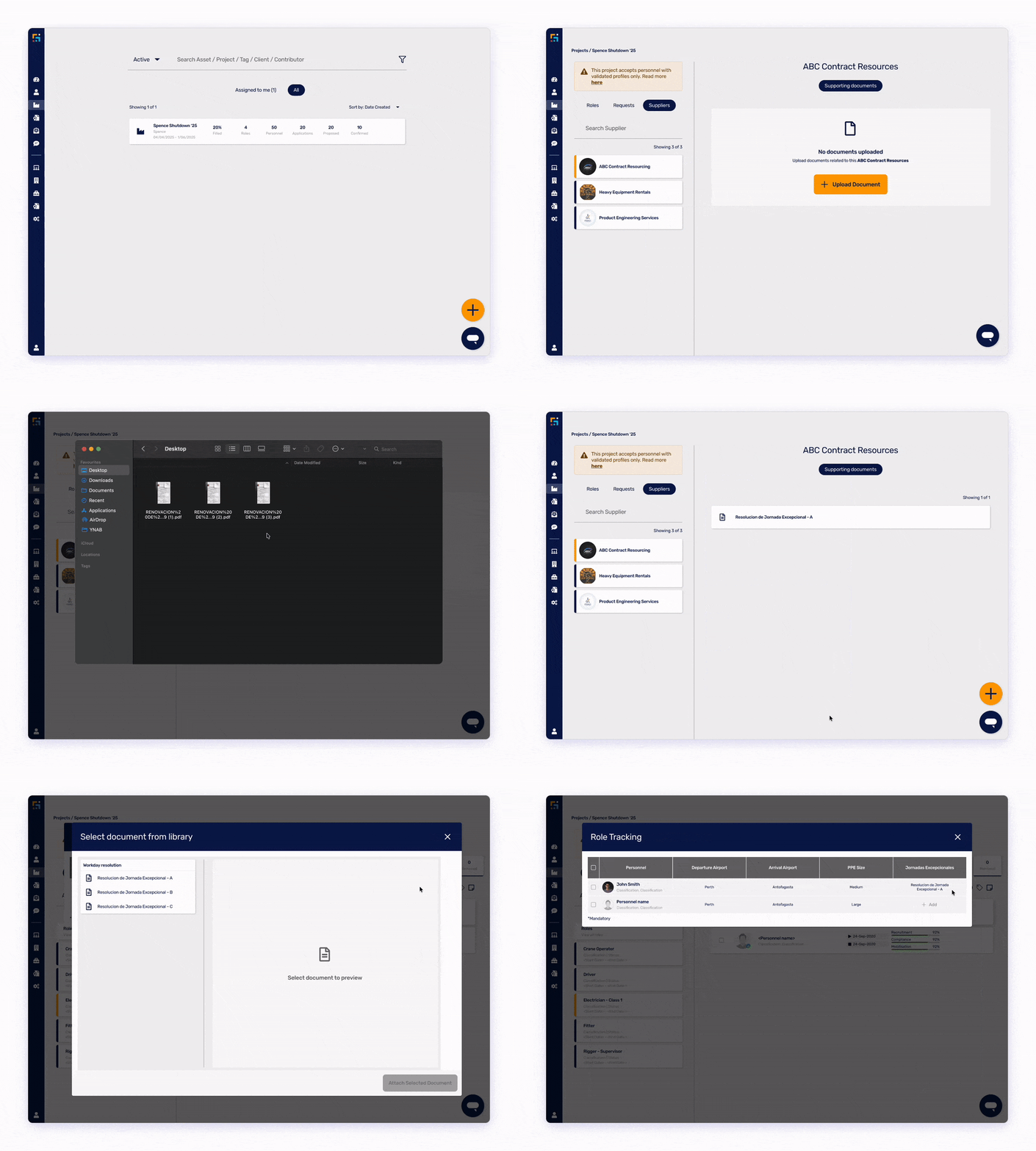
Project Documents enables operators to upload approved supplier documents directly within MyPass projects. Suppliers can then connect these documents to their workers via the Role Tracking Template.
For Asset Owners:
-
Upload project-specific documents against individual suppliers
-
Create document types relevant to your projects
-
Track which suppliers have submitted required documentation
-
Maintain a centralised repository of approved supplier documents
For Suppliers:
-
View documents uploaded by the project owner
-
Connect approved documents to worker roles via Role Tracking Template
-
Reduced admin overhead – No more chasing documents through multiple channels
-
Improved compliance – Clear visibility into supplier document status
-
Better organisation – All project documents in one secure location
-
Enhanced audit capability – Complete record of document uploads and distribution

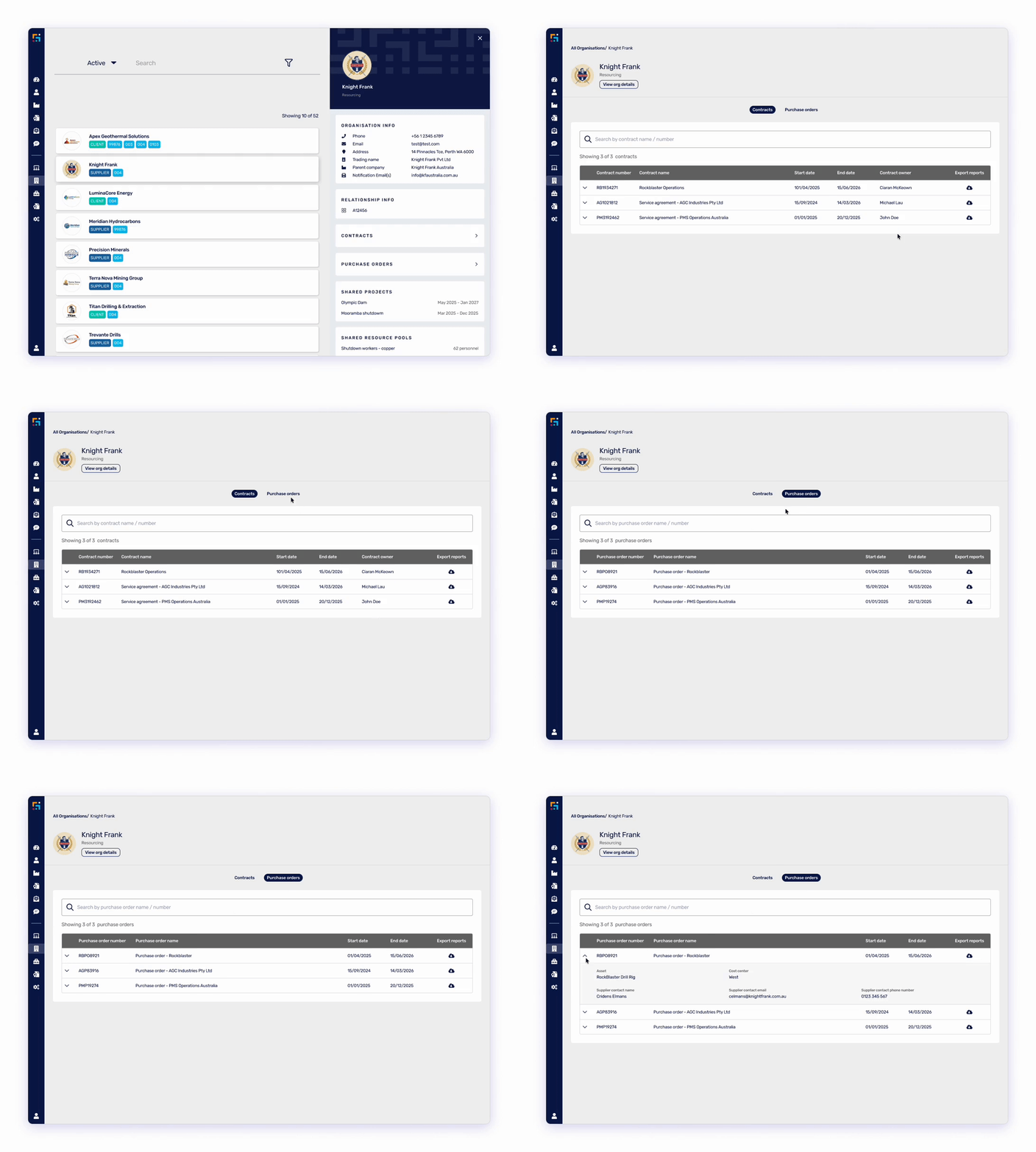
Supplier Organisations View: Enhance Auditing Capabilities
The challenge
Critical supplier details are often scattered across different systems, spreadsheets, and email threads, leading to operational inefficiencies for key user groups. Contract managers, labour relations teams, and compliance officers struggle to get a complete picture of supplier relationships without piecing together information from multiple sources.
This fragmented experience made supplier auditing time-consuming and increased the risk of missing critical information.
The solutions
We've enhanced the supplier auditing experience with a dedicated Contracts and Purchase Orders section directly on the supplier's profile.
Centralised contract visibility
-
View all contracts associated with a supplier in one location
-
Access full-screen list of contract records
-
See contract details, dates, and status at a glance
Comprehensive purchase order tracking
-
Complete view of all purchase orders for each supplier
-
Track resource requests linked to purchase orders
Powerful export functionality The standout feature of this enhancement is the new export capability, enabling you to generate comprehensive reports that include:
-
All subcontracts for the supplier
-
Resource requests and allocations
-
Project-specific documentation
-
Single-file download of all associated project documents
- Significant efficiency gains – Compile audit reports in minutes instead of hours
- Improved accuracy – Complete data capture reduces risk of missed information
- Better supplier management – Holistic view of supplier relationships
- Streamlined compliance – Easy documentation package creation for audits
This feature is particularly valuable for:
- Contract managers conducting supplier reviews
- Procurement teams managing supplier relationships
- Compliance teams preparing for audits
- Finance teams reconciling supplier spend

Public Profile Enhancement: Instant On-Site Compliance Checks
.gif?width=588&height=331&name=Adobe%20Express%20-%20Public%20profile%20enhancement%20(1).gif)
The challenge
On-site safety and security require instant visibility into worker compliance. However, verifying worker qualifications traditionally requires:
-
Logging into the MyPass platform
-
Looking up individual worker records
-
Checking physical license cards or certificates
-
Time-consuming verification processes that slow down site access
For site supervisors, safety managers, and senior leaders conducting field visits, this creates friction between security requirements and operational efficiency.
The solution
MyPass has introduced Public Profile Enhancement, allowing Asset Owners to include specific project role information on the public profile of all associated personnel.
The capabilities
What's displayed When someone scans a worker's QR code, the public profile shows:
- Role name and supplier
- Role compliance percentage
- Position requirements grouped by matrix
- Position-specific certificates
- High-level compliance status (no document previews for security)
Compliance criteria Role information appears publicly only when:
- The project has "Display role requirements on public view" enabled
- The worker is confirmed for a role within that project
- The role is active (QR code scanned within role start and end dates)
Use cases
Site supervisors Verify worker qualifications without logging into the platform when conducting routine compliance checks of crews from multiple suppliers.
Senior leadership field visits Site managers, Asset Presidents, and executives can quickly verify compliance during safety walkarounds and field leadership activities.
Cross-supplier verification Validate qualifications for workers provided by suppliers who aren't MyPass customers, using the QR code as proof of compliance.
How it works
1. Worker is confirmed to a project with public profile display enabled
2. On-site personnel scan the worker's MyPass QR code using their mobile device
3. Public profile displays role information and compliance status
4. Quick verification completed without platform login
- Faster site access – Instant compliance verification reduces entry delays
- Improved safety – Easy verification encourages more frequent compliance checks
- Operational flexibility – Adapts to your site processes rather than forcing platform use
- Enhanced security – Real-time validation without sharing sensitive documents
To enable this feature for your organisation, please contact MyPass support.

We Want Your Feedback
Your input shapes our product roadmap. Tell us what you think about these new features and what you'd like to see next:
-
Schedule a feedback session with your Customer Success representative
-
Look out for our next Customer Connection webinar invite in 2026
Thank you for being part of the MyPass community. We're excited to continue building solutions that make compliance management simpler, faster, and more effective.