
Thank you! Your submission has been received!
Un perfil verificado. Oportunidades ilimitadas.
Los trabajadores crean pasaportes de habilidades portátiles y verificados que funcionan en todos los sitios y contratistas, lo que elimina la incorporación repetitiva y brinda a los operadores una visibilidad del cumplimiento en tiempo real.


Tres brechas críticas en el cumplimiento tradicional de la fuerza laboral
Cómo los datos controlados por los trabajadores resuelven los tres problemas
Skills Passports elimina la duplicación de verificaciones, reduce su responsabilidad cibernética y ofrece datos verificados en los que puede confiar, mediante un cambio fundamental: los trabajadores controlan sus credenciales y usted accede a la verdad verificada.
Del caos de las hojas de cálculo a la visibilidad en tiempo real
Los trabajadores crean un pasaporte de habilidades completo. Cuando pasan del contratista A al contratista B en sus instalaciones, ambos contratistas acceden al mismo perfil verificado, lo que elimina la duplicación de la verificación y la búsqueda de hojas de cálculo en toda la cadena de suministro.
Un perfil verificado, varios puntos de acceso
Los sistemas tradicionales convierten a los empleadores en custodios de los datos, lo que genera responsabilidad cibernética y duplicación. Los pasaportes de habilidades convierten a los trabajadores en controladores de datos. Accede a datos verificados compartidos en lugar de almacenar la PII de los trabajadores, lo que permite ver directamente la fuerza laboral de los contratistas sin que cada contratista construya sistemas duplicados.
Protección escalable
La prevención de duplicados, única en el sector, garantiza un registro verificado por trabajador, lo que evita que los trabajadores despedidos por mala conducta creen varios perfiles o vuelvan a ingresar a su fuerza laboral a través de diferentes contratistas.
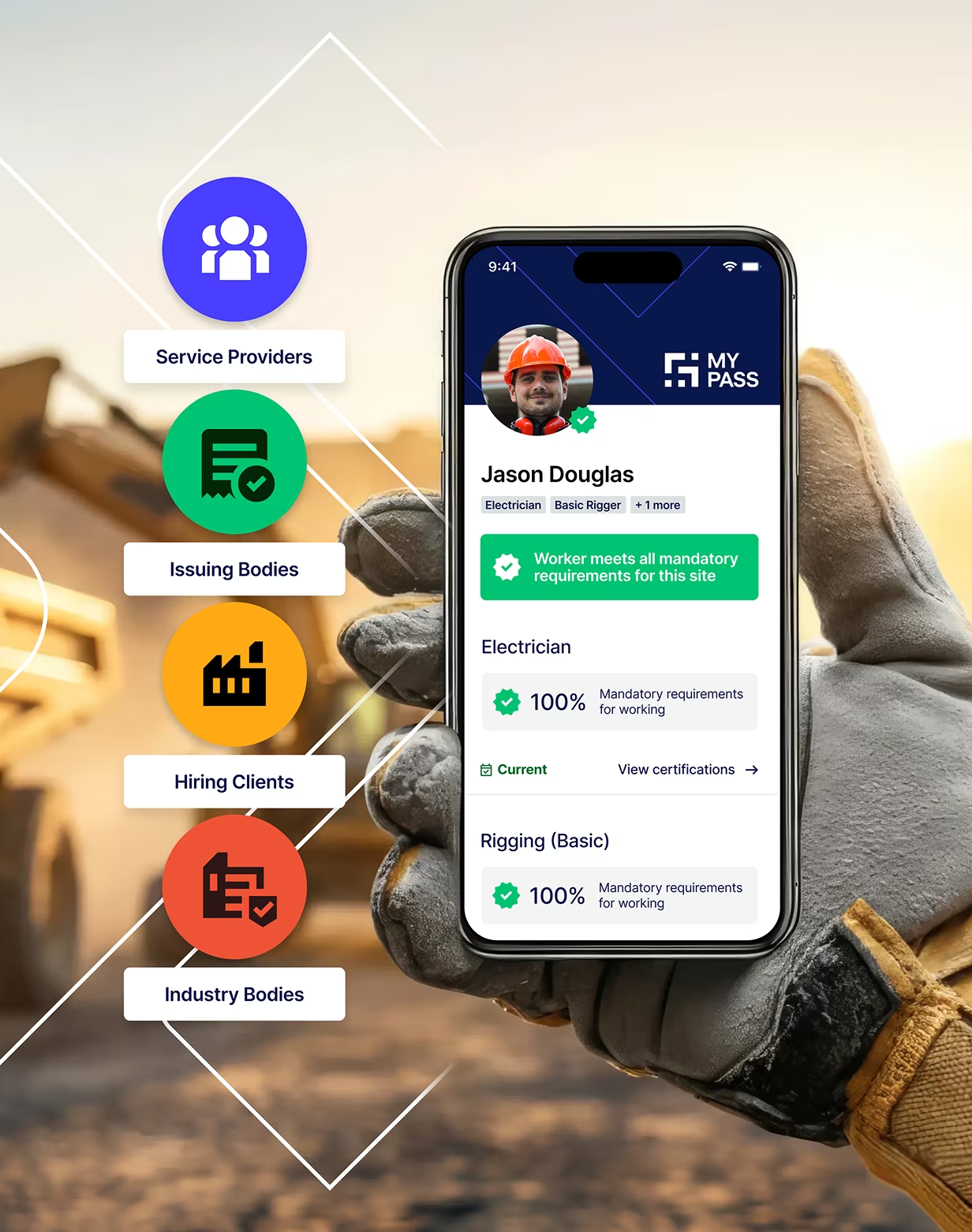
Generar confianza a través de datos verificados
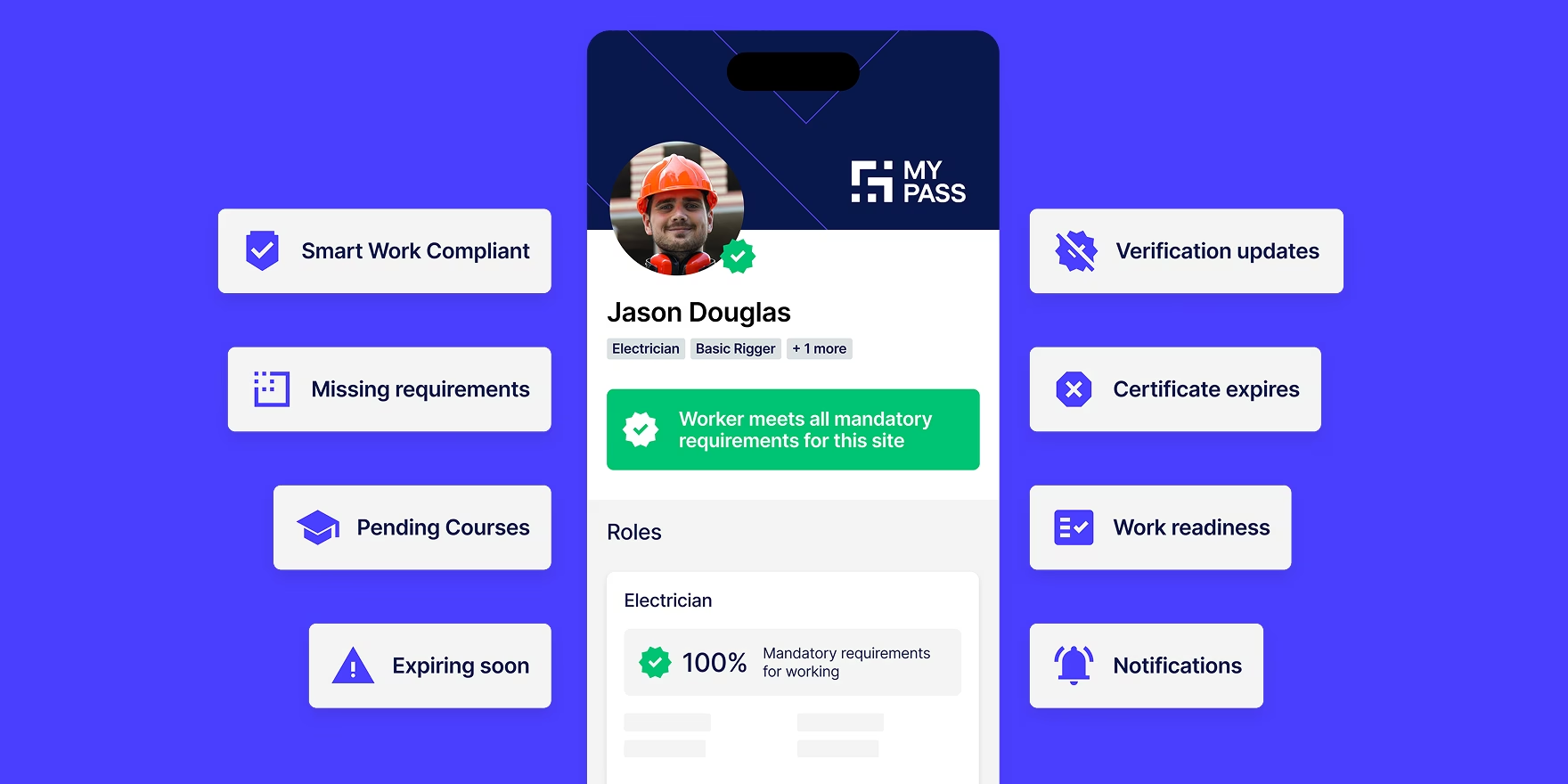
%20(1).webp)
Los trabajadores construyen su pasaporte
Los trabajadores crean perfiles completos que incluyen calificaciones, certificaciones, licencias de trabajo de alto riesgo, registros de capacitación, historial laboral y documentos médicos.
Disponible como aplicación móvil (Australia y Nueva Zelanda): Los trabajadores administran las credenciales desde cualquier lugar a través de iOS y Android. Cargue documentos con la cámara del dispositivo, acepte invitaciones a puestos de trabajo al instante y reciba notificaciones automáticas cuando las cualificaciones venzan. Cuenta con inicio de sesión biométrico y se sincroniza automáticamente con la plataforma web.
.webp)
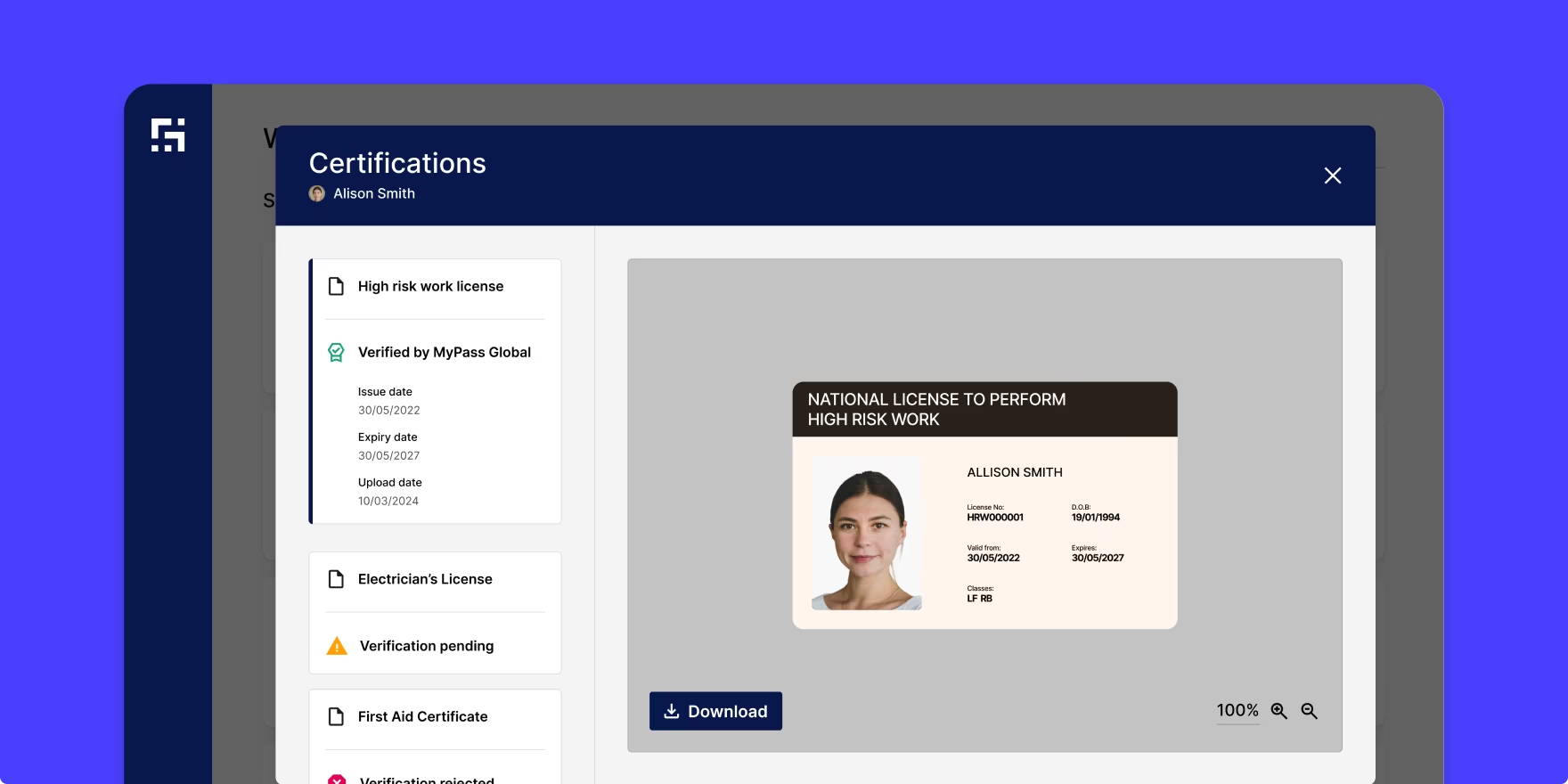
MyPass verifica en la fuente
MyPass valida los documentos a través de:
- Fuentes directas de las autoridades emisoras (si están disponibles)
- Bibliotecas de certificados con una coincidencia de código única
- Detección integral de duplicados
- Algoritmos para la prevención
- Specialized Verificación Review
.webp)
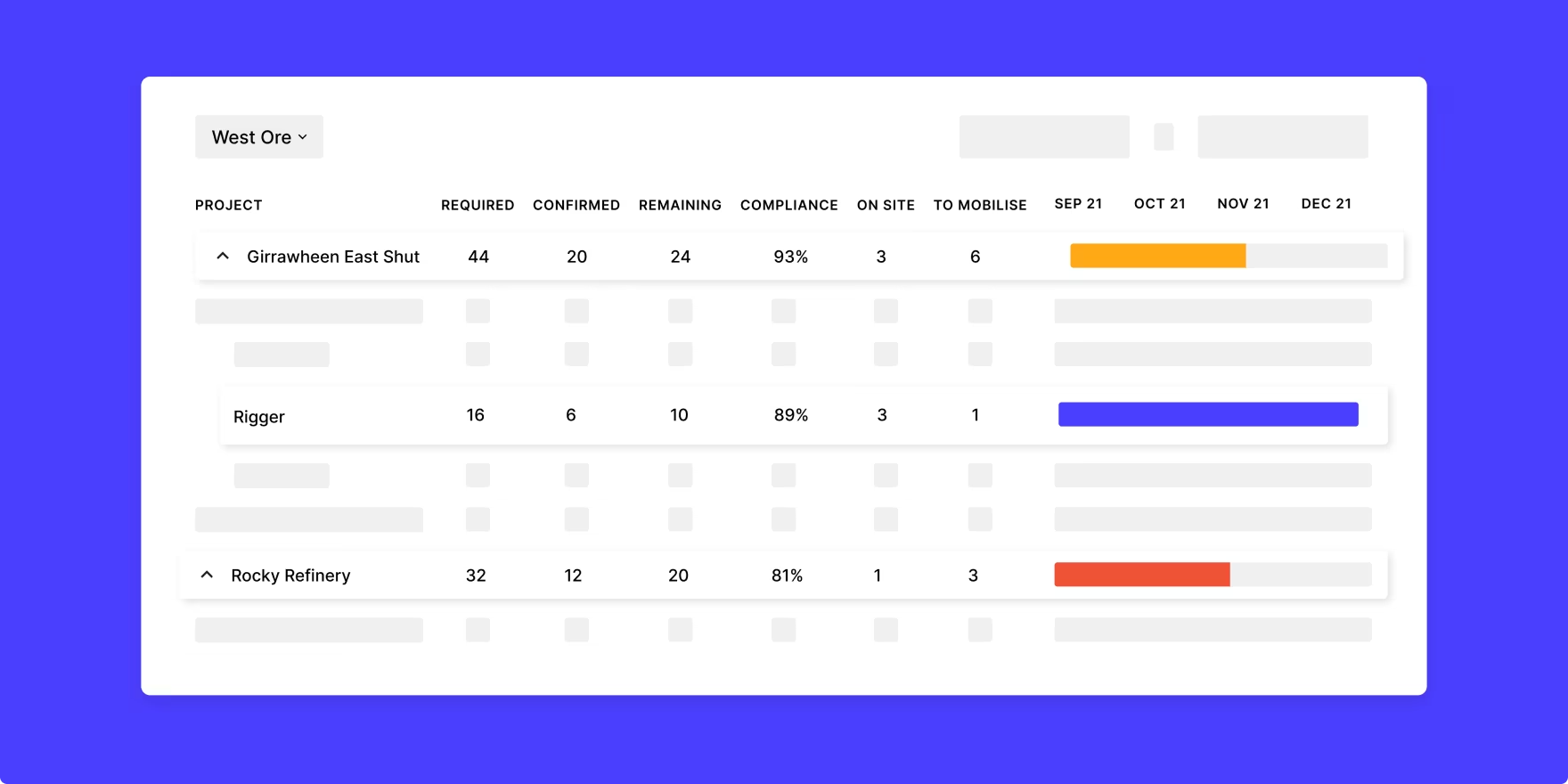
Los empleadores acceden a datos verificados
Los trabajadores conceden acceso a los empleadores:
- Estado de cumplimiento en tiempo real
- Alertas de caducidad automatizadas (90, 60, 30 días)
- Verificación QR móvil en campo
- Integración con los sistemas de acceso al sitio
- Portátil en todos los sitios y proyectos
Administración integral de credenciales
El impacto de las credenciales verificadas y portátiles
27%
Reducción del acceso de los trabajadores que no cumplen con las normas
3X
Movilización más rápida
35
Certificados fraudulentos interceptados mensualmente (promedio)
100
Horas ahorradas por ciclo de cumplimiento
Principales esfuerzos de estandarización de la industria
MyPass impulsa iniciativas de estandarización en todo el sector, como el marco común de Verisafe para las licencias de trabajo de alto riesgo, que permite a los propietarios de activos reducir la duplicación y, al mismo tiempo, mantener rigurosos estándares de verificación

CALIENTE 30 GANADOR
Innovación principal: Hot 30 2023

TECH FAST 50 GANADOR
Deloitte Tech Fast 50 2023

NEGOCIOS AUSTRALIANOS PREMIOS
Ganador de innovación de procesos 2021

UN INNOVADOR DE EL AÑO
Finalista de crecimiento 2021

PREMIO PARA EXCELENCIA
Finalista del People's Choice

MÁS INNOVADOR EMPRESAS
Ganador de la categoría 2023

REVISTA DE MINERÍA PREMIOS
Ganador del premio Software Excellence

INNOVACIÓN COVID-19 FONDO
Premio a la innovación 2020

AUSTRALIANO TECNOLOGÍAS
Ganador de la mejor tecnología 2019
Ayudamos a nuestros clientes a hacer más
Suscríbase a nuestro boletín

Cómo los pasaportes de habilidades permiten soluciones de fuerza laboral conectada
El pasaporte de habilidades es la base: descubra cómo impulsa la gestión integral de la fuerza laboral en diferentes casos de uso.
Los datos de Skills Passport se introducen en sus sistemas
Los pasaportes Workers' Skills se conectan a Industry Portal, que se integra con sus sistemas existentes, creando una solución completa de cumplimiento de la fuerza laboral.
Common questions about MyPass Skills Passport
How is the Skills Passport different from a traditional worker profile?
A Skills Passport is worker-owned and portable. Traditional systems have employers maintain separate records for each worker, creating data silos, duplicate verification, and compliance blind spots across the supply chain. With a Skills Passport, workers build one verified profile that follows them across every employer, site, and project. Operators access shared verified data rather than each building their own duplicate records.
The practical difference: a worker moving from one contractor to another on your site doesn't get re-verified from scratch. Their qualifications are already confirmed. Industry audits find 1 in 650 workers carries a fraudulent document. MyPass catches these at the source rather than relying on each employer to independently spot them.
What credentials can be stored in a Skills Passport?
A Skills Passport holds qualifications, certifications, high-risk work licences, training records, work history, and medical documents. In Australia and New Zealand this includes trade licences, white cards, confined space entry, working at heights, first aid, site-specific inductions, and any role-specific competency records required by operators or industry bodies.
Workers upload documents directly via the mobile app or web platform. MyPass validates each document through direct feeds from issuing authorities where available, certificate libraries with unique code matching, and specialist verification team review. Documents that cannot be confirmed are flagged rather than accepted.
Who can see worker information in their Skills Passport?
Workers control who sees their Skills Passport. Access is granted by the worker to specific employers for specific timeframes and can be revoked when an engagement ends. Workers are the data controller, not the employer and not MyPass.
Employers who have been granted access see real-time compliance status, credential documents, and expiry alerts. They do not retain a copy of the worker's data when access is revoked. This architecture reduces employer cyber liability compared to traditional models where employers store and maintain worker PII directly.
How do you verify the documents in Skills Passports are legitimate?
MyPass verifies documents through direct feeds from issuing authorities where available, certificate libraries with unique code matching, fraud prevention algorithms, and specialist verification team review. This is the difference between knowing a worker is qualified and trusting that they are.
A scanned PDF can be expired, altered, or belonging to a different person. Document verification through MyPass confirms the credential is current, valid, and held by that specific worker, not just that a document exists. MyPass intercepts an average of 35 fraudulent certificates per month across the platform.
What happens when a worker's qualification expires?
Workers receive automated reminders at 90, 60, and 30 days before a qualification expires. They upload the renewed document directly through the mobile app or web platform. Employers with access to that worker's passport see the updated status in real time.
If a qualification lapses without renewal, the credential is flagged as expired in the worker's profile and any employer with access sees this immediately. Workers with expired critical qualifications are identifiable before mobilisation rather than after arrival at the gate.
Can workers access their Skills Passport through a mobile app?
Yes. The MyPass mobile app is available on iOS and Android for workers in Australia and New Zealand. Workers can upload documents using their device camera, accept role invitations, view their compliance status, and receive push notifications for expiring qualifications. The app uses biometric login and syncs automatically with the web platform.
Employers can verify worker credentials in the field by scanning a worker's QR code from any mobile browser, with no app download required on the supervisor's device.
Does the Skills Passport work offline or in remote locations?
Workers can access and display their Skills Passport credentials offline once the app has loaded. Supervisors verifying credentials via QR code require an internet connection at the point of scan. For remote sites with limited connectivity, workers can display their credential status from a previously loaded session on the app.
MyPass is designed for use in mining, oil and gas, energy, and construction environments where remote access is a standard operational consideration.
Is the Skills Passport free for workers?
Yes. Workers create and manage their Skills Passport at no cost. The platform is free for workers to use, including the mobile app, document uploads, and credential sharing with employers.
Employers and operators pay for access to the Industry Portal, which gives them compliance dashboards, workforce visibility, automated alerts, and integration with site access systems. Workers are never charged to verify their credentials or share their profile with an employer.
How does the duplicate worker detection work?
MyPass maintains one verified record per worker across the entire platform, not just within a single employer's account. When a new worker profile is created, it is checked against existing records to identify duplicate accounts. Workers who have been dismissed for misconduct by one employer cannot create a fresh profile and re-enter a workforce through a different contractor without that history being flagged.
This is an industry-unique capability. Traditional employer-siloed systems have no visibility across organisations, meaning a worker's record at one company is invisible to another. MyPass operates as shared infrastructure across the industry, which is what makes cross-employer duplicate detection possible.
How does the Skills Passport handle workers in different countries?
Yes. Workers create and manage their Skills Passport at no cost. The platform is free for workers to use, including the mobile app, document uploads, and credential sharing with employers.
Employers and operators pay for access to the Industry Portal, which gives them compliance dashboards, workforce visibility, automated alerts, and integration with site access systems. Workers are never charged to verify their credentials or share their profile with an employer.
Is the Skills Passport free for workers?
Yes. Workers create and manage their Skills Passport at no cost. The platform is free for workers to use, including the mobile app, document uploads, and credential sharing with employers.
Employers and operators pay for access to the Industry Portal, which gives them compliance dashboards, workforce visibility, automated alerts, and integration with site access systems. Workers are never charged to verify their credentials or share their profile with an employer.
How does the duplicate worker detection work?
MyPass maintains one verified record per worker across the entire platform, not just within a single employer's account. When a new worker profile is created, it is checked against existing records to identify duplicate accounts. Workers who have been dismissed for misconduct by one employer cannot create a fresh profile and re-enter a workforce through a different contractor without that history being flagged.
This is an industry-unique capability. Traditional employer-siloed systems have no visibility across organisations, meaning a worker's record at one company is invisible to another. MyPass operates as shared infrastructure across the industry, which is what makes cross-employer duplicate detection possible.
How does the Skills Passport handle workers in different countries?
MyPass operates across Australia, New Zealand, and Chile, with credential verification adapted to each country's regulatory and licensing frameworks. Workers operating across these regions hold one passport with country-specific qualifications verified against the relevant issuing authorities in each jurisdiction.
For operators managing cross-border workforces, Skills Passports carry the worker's full credential history regardless of which country the work was originally verified in, with site and role requirements set by the operator for the specific jurisdiction.
What training or onboarding do workers need to use the Skills Passport?
Workers typically complete setup in under 30 minutes. The process involves creating a profile, uploading existing credential documents, and connecting with an employer or contractor who is already using MyPass. Workers receive guided prompts through each step on the mobile app or web platform.
No technical background is required. The platform is designed for tradespeople, labourers, and specialist contractors across mining, oil and gas, energy, and construction. Daniel Terblanche, a Boilermaker Leading Hand at Programmed, noted that what previously took up to a week and a half to get documents approved now takes a day using MyPass.
Still have questions?
Didn’t find the answers you’re looking for? Get in touch with the team at MyPass
Get in touch
Vea Skills Passport en acción
Certificado ISO27001
Descripción
Con la confianza de más de 1500 organizaciones
Descripción
.webp)
Lo último de MyPass
Descubre lo que está pasando con MyPass y cómo puedes participar
Press
Se lanza un nuevo programa de energía limpia y preparado para trabajar a medida que crece la demanda de mano de obra renovable calificada.
El Consejo de Energía Limpia ofrece la primera matriz de habilidades y capacitación acordada por la industria, con un pasaporte digital de habilidades a través de MyPass Global, lo que acelera las carreras en energía limpia.
Read article
February 23, 2026
